AI
Agentic
Agentic Strategy

Here’s the thing. A lot of teams are moving towards simplicity. Fewer tools, less friction, more reuse. More importantly, we are moving towards work products that machines can read and machines can understand, without losing the human ability to look at something and go, “ah, I get it”.
Mermaid is a great example of that.
Instead of drawing diagrams in a separate tool, you write a small bit of text inside your Markdown and the tooling renders it into a diagram. That means your meeting notes, your runbooks, your README files, your decision logs, they can contain both:
That is the bridge I care about. Humans need to visualise. Machines need the data. When both get what they need from the same artefact, things get calmer.
Mermaid is diagrams as text. You write something like a flowchart in a code block, and the renderer turns it into a visual diagram.
GitHub put it neatly:
"Mermaid is a Markdown-inspired tool that renders text into diagrams. For example, Mermaid can render flow charts, sequence diagrams, pie charts and more."
Source: GitHub Docs, https://docs.github.com/en/get-started/writing-on-github/working-with-advanced-formatting/creating-diagrams
If you want to go deeper on syntax, the official reference is worth bookmarking.
Source: https://mermaid.js.org/intro/syntax-reference.html
Most diagrams rot for one boring reason. They are not maintained because they are not easy to maintain.
A slide gets exported. A screenshot goes in a wiki. Someone owns a file on their laptop. Nobody wants to touch it.
So, here’s the actionable pattern, and it works whether you are a startup or a big org.
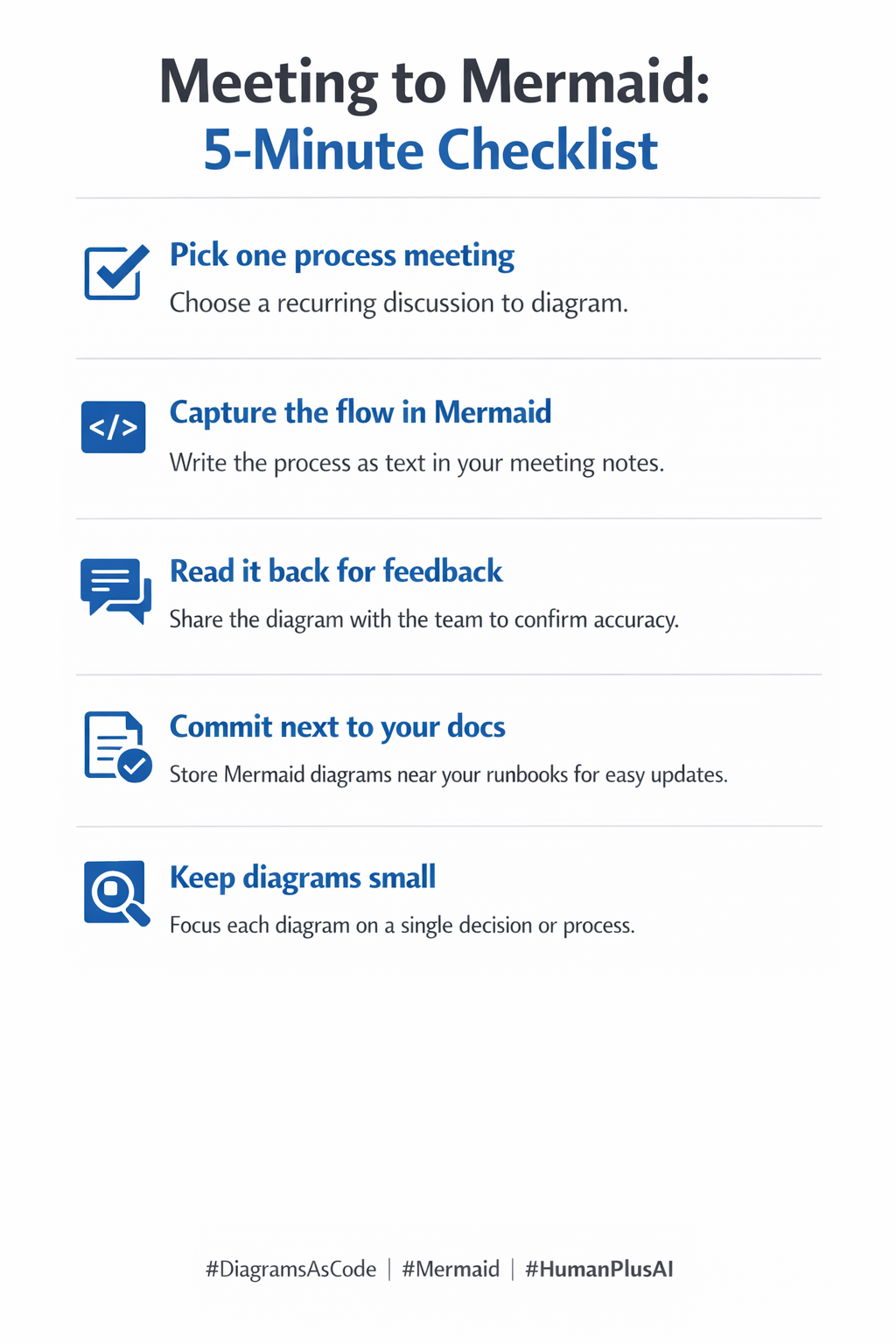
1. Capture the conversation
2. Turn it into Mermaid text
3. Confirm it with humans
4. Store it where it can be maintained
5. Let agents consume the structure
This is why I keep calling Mermaid a shared language. It is one artefact serving two audiences.
Canonical describe the maintainability win in a way I think most teams feel in their bones:
"Creating diagrams as code solves this by keeping them alongside the software source, making updates and reviews simpler."
Source: Documentation starter pack, https://canonical-starter-pack.readthedocs-hosted.com/dev/how-to/diagrams-as-code-mermaid/
Example (flowchart), paste this into a Markdown file and render it where Mermaid is supported:
flowchart TD
  A[Meeting conversation] --> B[Draft Mermaid in Markdown]
  B --> C[Team confirms meaning]
  C --> D[Commit to repo]
  D --> E[Humans see diagram]
  D --> F[AI reads structure]
That is the whole point. You keep the visual, and you keep the data.
If you want more flowchart options (decision diamonds, labels, subgraphs), Mermaid Chart’s flowchart syntax guide is a practical reference.
Source: https://mermaid.ai/open-source/syntax/flowchart.html
This is the part people skip, then complain later.
If you are already collaborating in GitHub, Mermaid becomes a natural part of the workflow. GitHub’s own docs highlight that diagrams can live where your conversations and reviews already happen:
"You can create diagrams in Markdown using four different syntaxes: mermaid, geoJSON, topoJSON, and ASCII STL. Diagram rendering is available in GitHub Issues, GitHub Discussions, pull requests, wikis, and Markdown files."
Source: GitHub Docs, https://docs.github.com/en/get-started/writing-on-github/working-with-advanced-formatting/creating-diagrams
That matters because it turns diagrams from “a thing someone made” into “a thing the team maintains”.
1. Process map that stops drifting
2. Incident runbook clarity
3. Decision flow for leadership
Build small, learn fast. The goal is not “beautiful diagrams”. The goal is shared understanding that can be maintained.
"Mermaid is a Markdown-inspired tool that renders text into diagrams. For example, Mermaid can render flow charts, sequence diagrams, pie charts and more."
Source: GitHub Docs, https://docs.github.com/en/get-started/writing-on-github/working-with-advanced-formatting/creating-diagrams
"You can create diagrams in Markdown using four different syntaxes: mermaid, geoJSON, topoJSON, and ASCII STL. Diagram rendering is available in GitHub Issues, GitHub Discussions, pull requests, wikis, and Markdown files."
Source: GitHub Docs, https://docs.github.com/en/get-started/writing-on-github/working-with-advanced-formatting/creating-diagrams
"Creating diagrams as code solves this by keeping them alongside the software source, making updates and reviews simpler."
Source: Documentation starter pack, https://canonical-starter-pack.readthedocs-hosted.com/dev/how-to/diagrams-as-code-mermaid/
#Educate #Mermaid #Markdown #DiagramsAsCode #Documentation #AgenticSystems #HumanPlusAI